

You are building an application that summarizes documents or fixes code. One model has lower token prices, but it needs several attempts to produce something usable. Another charges more per token and finishes on the first attempt.
The pricing table tells you what each unit of usage costs. It does not tell you how much you will spend to obtain an acceptable result. The cheapest model per million tokens is not automatically the cheapest model for a completed task.
What is a token?
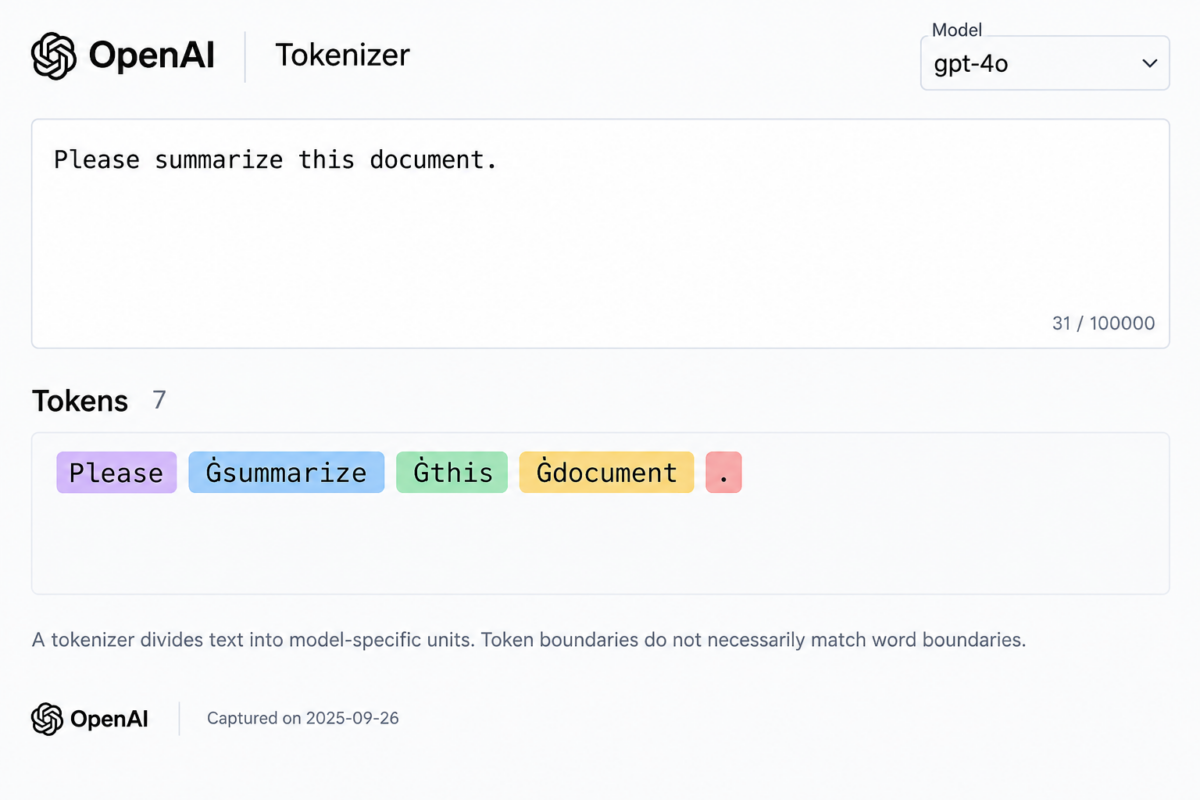
A token is a small unit of content that a model processes. For text, it might represent a word, part of a word, punctuation, or a sequence of characters. A tokenizer is the software that converts text into these units. Different models can use different tokenizers.
Consider this sentence:
“Please summarize this document.”
The tokenizer divides the sentence into tokens before the model processes it. The boundaries do not necessarily match the spaces between words. Languages, code, numbers, and other content types can produce different token counts, so counting words is not a reliable billing method. Use the appropriate tokenizer for an estimate and the API’s reported usage for accounting.
Input, output, and reasoning tokens
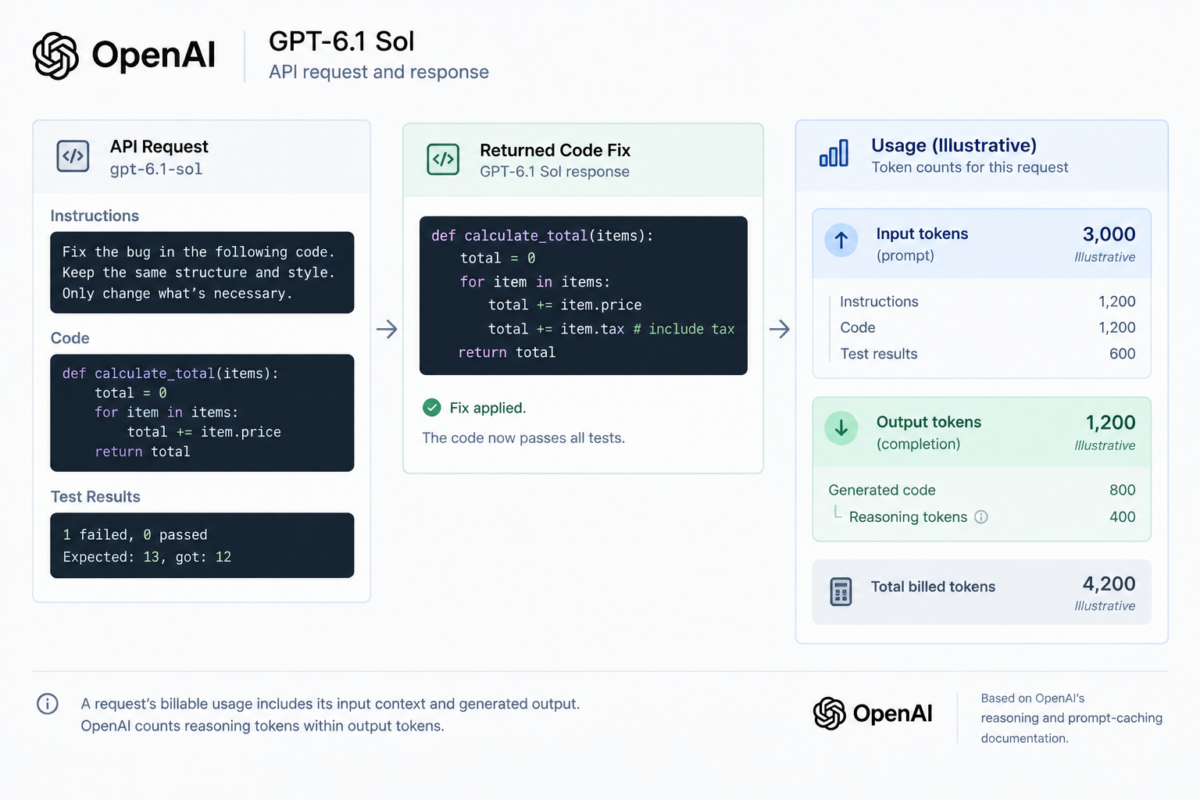
Imagine a request asking GPT-6.1 Sol to repair a JavaScript function. Your application sends instructions, the function, and failing test results. The model returns corrected code and an explanation.
Input includes more than the latest user message. In OpenAI’s APIs, the processed context can include system or developer instructions, conversation history, tool definitions, and tool results. A tool definition describes a function the model may call, including its arguments. A tool result becomes input when the application returns it to the model.
Output includes generated content such as the answer and tool-call arguments. For reasoning models, the visible answer is only part of the billable output.
OpenAI defines reasoning tokens as internal tokens used to work through a task. Their raw text is not exposed through the API, but they are billed as output tokens. The reported output_tokens already include them. Do not add reasoning_tokens to that total again.
Here is an illustrative usage object for a GPT-6.1 Sol response. The numbers are invented, but the field names are documented:
{
“usage”: {
“input_tokens”: 3000,
“input_tokens_details”: {
“cached_tokens”: 0,
“cache_write_tokens”: 0
},
“output_tokens”: 1200,
“output_tokens_details”: {
“reasoning_tokens”: 800
},
“total_tokens”: 4200
}
}
This request has 3,000 input tokens and 1,200 billable output tokens. The 800 reasoning tokens are a subset of the output. The remaining output is not necessarily all visible prose because generated output can also include non-visible formatting tokens.
Log response.usage alongside the model ID and request ID. OpenAI’s usage dashboard provides account-level tracking, while request logs help connect spending to individual tasks. Total_tokens alone is insufficient for calculating cost because input and output have different rates.
Reasoning controls and accounting differ between providers and models. Even within this selection, GPT-6 Luna supports reasoning effort none, while GPT-6 Astra and GPT-6.1 Sol do not. Record the configuration rather than assuming that identical model calls perform identical amounts of work.
How to read AI model pricing
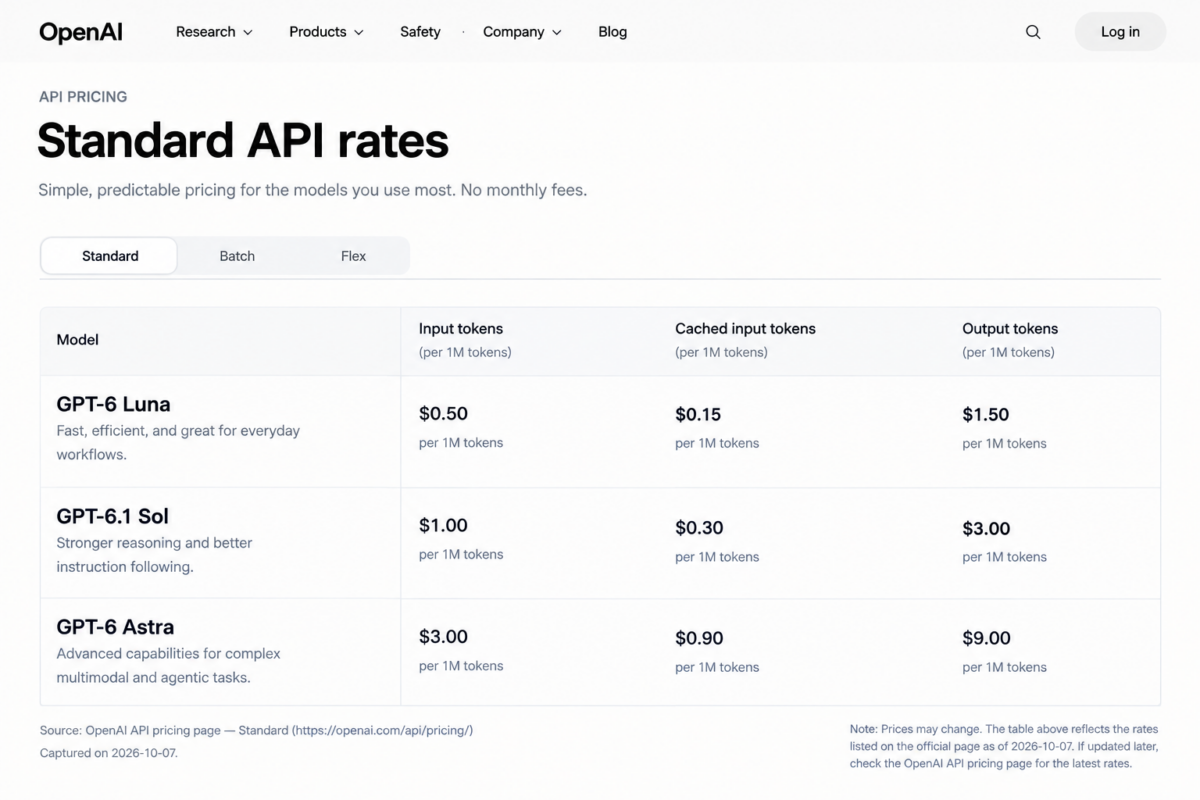
The following comparison concerns API usage, not a consumer chatbot subscription. OpenAI bills API usage separately from ChatGPT plans. All prices are USD per million text tokens, checked on October 7, 2026.
These three currently available models offer different intended usage profiles: GPT-6 Luna targets focused, high-volume work; GPT-6.1 Sol targets complex coding and professional workflows; GPT-6 Astra targets the most demanding work. Those descriptions help select candidates, but they do not establish which model is best for your application.
| Model and API ID | API provider | Standard input | Standard output | Cached-input read |
| GPT-6 Luna, gpt-6-luna | OpenAI | $0.10 | $0.50 | $0.01 |
| GPT-6.1 Sol, gpt-6.1-sol | OpenAI | $2.00 | $10.00 | $0.10 |
| GPT-6 Astra, gpt-6-astra | OpenAI | $10.00 | $50.00 | $1.00 |
The table shows OpenAI’s standard API prices for requests below 272,000 input tokens, without Batch discounts or other special pricing. Calculate input and output separately. For GPT-6.1 Sol, output tokens cost five times as much as ordinary input tokens, so a long answer can cost more than an equally long prompt. Longer requests may have different rates.
Caching can reduce input costs when a request starts with the same eligible content as an earlier request. It reuses processed input, not a previous answer, so the model still generates a new response. For these models, the minimum cacheable prefix is 1,024 visible input tokens. Cache writes cost 1.25 times the standard input rate, while successful cache reads use the lower rates listed in the table. Repeated content does not guarantee a cache hit.
Batch pricing is another way to reduce costs when you do not need an immediate response. OpenAI offers a 50% discount on input and output for asynchronous jobs processed within a 24-hour window. Keep that discount separate from standard interactive pricing. If you use another API provider, check its complete pricing table rather than assuming the same model has the same rates everywhere.
How to calculate the cost of a request
For a standard text request without cache reads or writes:
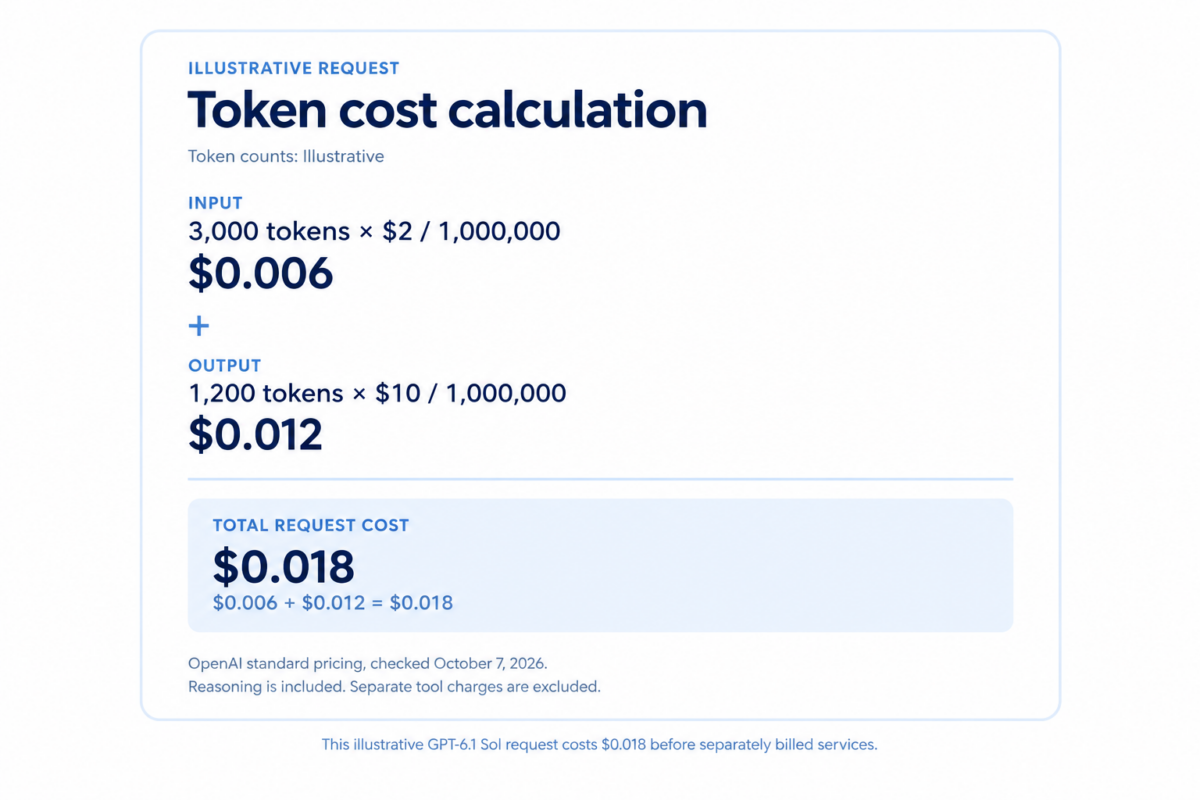
Request cost = (input tokens / 1,000,000 × input price) + (billable output tokens / 1,000,000 × output price)
Use the illustrative GPT-6.1 Sol usage object:
- Input: (3,000 / 1,000,000) × $2.00 = $0.006.
- Output: (1,200 / 1,000,000) × $10.00 = $0.012.
- Total: $0.006 + $0.012 = $0.018.
The request costs 1.8 cents using the verified standard rates. The counts are illustrative, not measured. Its reasoning usage is already covered by the output calculation.
When caching applies, divide input into mutually exclusive categories:
Input cost = (ordinary input tokens / 1,000,000 × ordinary input price) + (cache-read tokens / 1,000,000 × cache-read price) + (cache-write tokens / 1,000,000 × cache-write price)
For this API, ordinary input tokens equal total input tokens minus cached-read tokens minus cache-write tokens. Each category receives its own rate. This prevents charging cached tokens twice.
The basic calculation excludes separately billed services. OpenAI lists additional charges for tools such as web search and containers. An agent that searches, executes code, and makes several model calls needs a task-level ledger containing every applicable charge.
Also record incomplete responses. OpenAI documents cases where a reasoning model reaches its output limit before producing visible text. Input and reasoning usage can still incur costs even though the user receives no usable answer.
Why a higher-priced model can cost less
Define success before comparing cost. For a code-repair task, success might mean that the patch passes every specified test, preserves the public interface, and requires no human correction.
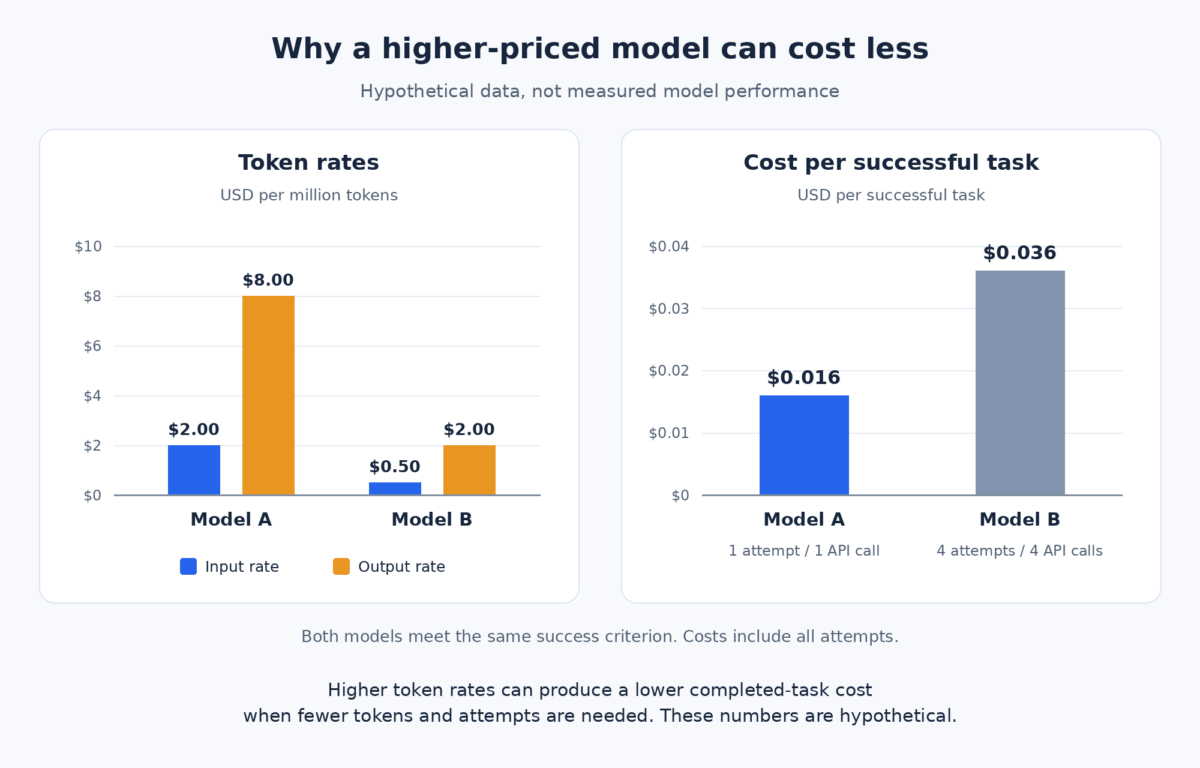
The following example is entirely hypothetical. Model A and Model B are invented labels. Both eventually meet the same success criterion. Each attempt contains one API call, and all tokens use ordinary rates without caching or paid tools.
| Measurement | Model A | Model B |
| Input price per million tokens | $2.00 | $0.50 |
| Output price per million tokens | $8.00 | $2.00 |
| Total input tokens across attempts | 4,000 | 24,000 |
| Total billable output tokens | 1,000 | 12,000 |
| Attempts and API calls | 1 | 4 |
| Total task cost | $0.016 | $0.036 |
| Meets the success criterion | Yes | Yes |
Model A costs (0.004 × $2.00) + (0.001 × $8.00) = $0.016.
Model B costs (0.024 × $0.50) + (0.012 × $2.00) = $0.036.
Model A has four times the input and output rates, yet obtaining the successful result costs less. Model B’s total includes failed attempts, repeated context, and additional output. Comparing only its first call would hide part of the expense.
Keep these measurements separate:
- Price per token is the listed rate for a unit of usage.
- Cost per attempt covers one attempt, which may contain several calls.
- Cost per successful task includes spending on failures and retries.
- Quality measures whether the result meets the requirements.
- Completion time measures how long obtaining that result takes.
Fewer retries may reduce completion time, but this example contains no timing measurements. It proves nothing about either model’s latency.
The opposite outcome is possible. A cheaper model may complete a simple classification or extraction task correctly on its first attempt. Paying more then provides no useful benefit unless it improves a requirement you actually care about.
Token efficiency also differs from hardware or serving efficiency. Producing fewer billable tokens can reduce a customer’s bill. Faster infrastructure can reduce waiting time, but under fixed per-token rates it does not automatically reduce the charge for the same token usage.
Comparing models with Artificial Analysis
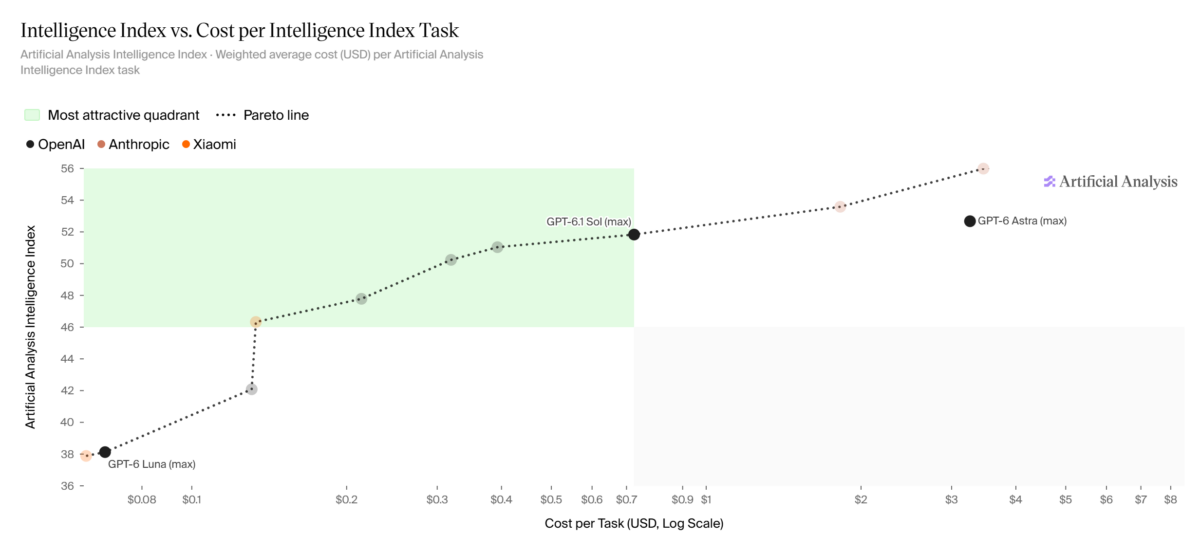
Artificial Analysis provides independent model comparisons that can help build a shortlist. Its model comparison page includes intelligence, pricing, token use, cost, output speed, and latency. Check the model variant and provider represented by each point before comparing it with your planned deployment.
Start with “Intelligence Index vs. Cost per Intelligence Index Task.” Higher points have stronger aggregate benchmark performance; points farther left have lower reported task costs. The useful candidates are those near the quality level your project needs, rather than automatically the highest-scoring model.
As checked on October 7, 2026, Intelligence Index v4.3.2 combines ten evaluations. Its methodology describes a weighted score scaled from 0 to 100, with agents, coding, general capability, and scientific reasoning each contributing 25%. The score represents performance on that suite, not the probability that your application will succeed.
“Cost per Intelligence Index Task” uses actual evaluation token consumption. Artificial Analysis calculates each evaluation’s cost from input, cache hits, cache writes, reasoning, and answer tokens, divides by task count, and applies the Index’s benchmark weights. Reasoning costs are included where applicable. Its separate “Cost to Run Artificial Analysis Intelligence Index” chart covers the whole suite, not one user request. Neither metric is your application’s cost per successful task.
Then inspect “Output Tokens per Intelligence Index Task,” which separates answer and reasoning usage. It helps explain why models with similar rates can have different evaluation costs. Do not assume a concise visible answer means little reasoning usage.
Read price labels carefully. Artificial Analysis’s documented blended price assumes a 7:2:1 ratio of cache-hit, ordinary input, and output tokens. That mix may differ substantially from your workload. Use separate provider rates when calculating your own requests.
Speed also needs context. Artificial Analysis uses a standardized OpenAI-token unit for tokens-per-second comparisons, while prices generally refer to each model’s native tokens. “Time to First Answer Token” includes a reasoning model’s thinking time. Its “Time per Intelligence Index Task” measures weighted decode time and excludes time to first token and overhead. Neither should be substituted for measured end-to-end application latency.
Benchmarks narrow the search; your own evaluation makes the decision. Results and rankings can change with model releases, reasoning settings, providers, and methodology updates.
Choosing the most cost-efficient model for your project
Start with 20 representative tasks. That is a practical starting point, not a statistically validated sample size. Include routine cases, difficult cases, and inputs that resemble what users will actually submit.
Write the success rules first. For extraction, require valid structured output and correct mandatory fields. For code, require passing tests and preserved behavior. For summaries, use a rubric covering factual accuracy and required information. Decide whether any human correction disqualifies the result.
Give each candidate the same task inputs, tools, retrieved information, retry limits, and stopping rules. Record model-specific differences such as reasoning effort and supported output controls. Test the setup you would deploy rather than forcing every model into a configuration it cannot support.
Log every call, including unsuccessful attempts:
- Total billable input tokens, separated into ordinary, cache-read, and cache-write categories.
- Total billable output tokens, with reasoning recorded as a subset where appropriate.
- Total API cost across all attempts and retries.
- Successful tasks, API calls, and attempts.
- End-to-end task latency, including tool execution and retries.
- Separate tool or service charges.
- Whether human correction was needed and how much work it required.
Use this calculation:
Cost per successful task = total evaluation cost / number of successful tasks
The numerator includes spending on tasks that never succeeded. If no tasks succeed, the metric is undefined. Do not report zero cost per success.
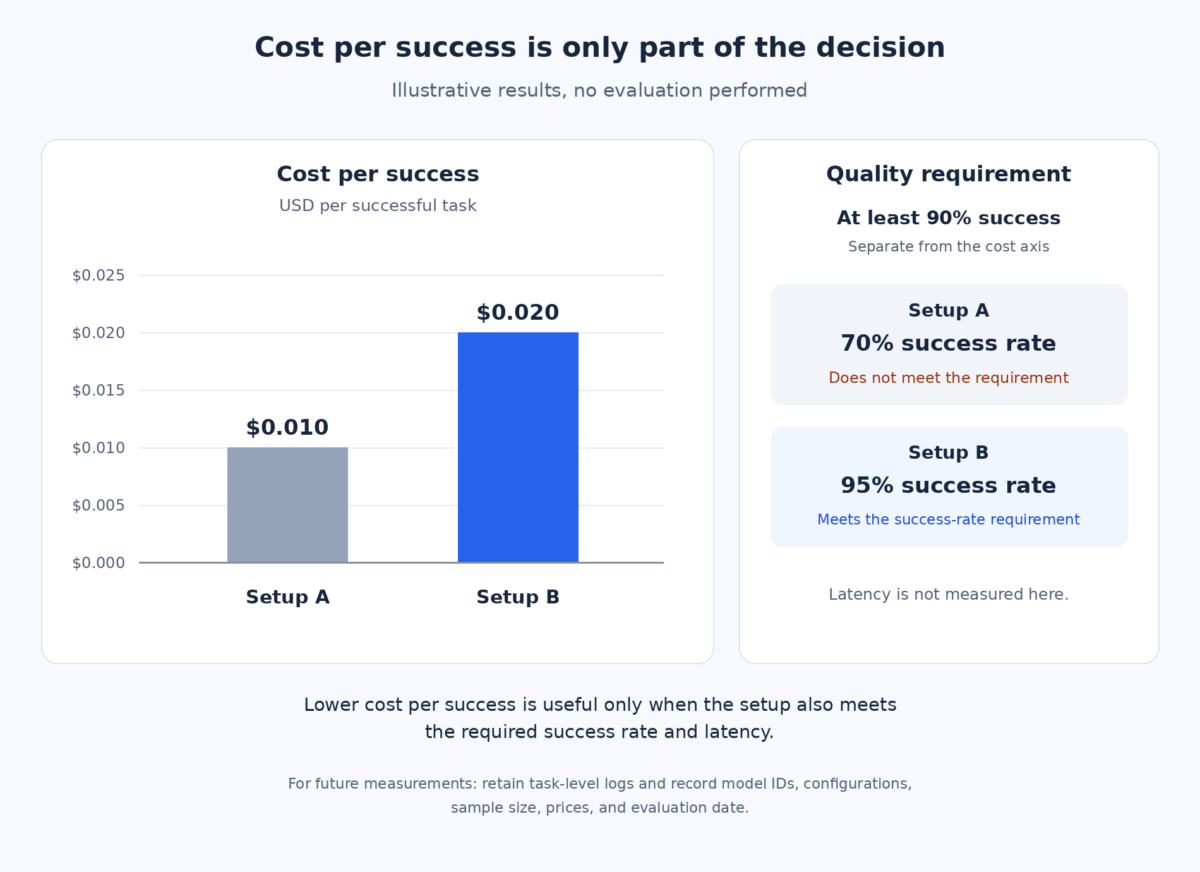
This illustrative results table shows the reporting format. These are invented setups and numbers, not tests of the researched models.
| Measurement | Setup A | Setup B |
| Tasks evaluated | 20 | 20 |
| Tasks successful without correction | 14 | 19 |
| Success rate | 70% | 95% |
| API cost including retries | $0.14 | $0.38 |
| Separate tool charges | $0.00 | $0.00 |
| Total API calls | 32 | 23 |
| Median end-to-end task latency | 1.2 seconds | 3.0 seconds |
| Tasks needing human correction | 6 | 1 |
| Cost per successful task | $0.010 | $0.020 |
Setup A has the lower cost per success, but it would fail a project requirement of at least 90% success without correction. Setup B would pass that quality threshold. Whether its latency is acceptable is a separate decision.
A routed setup is another candidate: use a smaller model for routine tasks and escalate difficult or failed cases to another model. Include the initial call, routing work, escalated call, repeated context, and tools in its total. Escalation is economical only if the complete setup meets the requirements at a lower measured cost.
After a small initial test, repeat close comparisons on a larger sample. Check slow cases as well as the median. Select the lowest-cost setup that meets the project’s quality and latency requirements.
Sources
Pricing and methodology checked on October 7, 2026.
- OpenAI tokenizer
- OpenAI API pricing
- OpenAI GPT-6 model guide
- OpenAI reasoning models documentation
- OpenAI prompt caching documentation
- OpenAI Responses API reference
- Artificial Analysis model comparisons
- Artificial Analysis benchmarking methodology
- Artificial Analysis Intelligence Index
Author
Luka Marinković, student
Text is partially generated by artificial intelligence